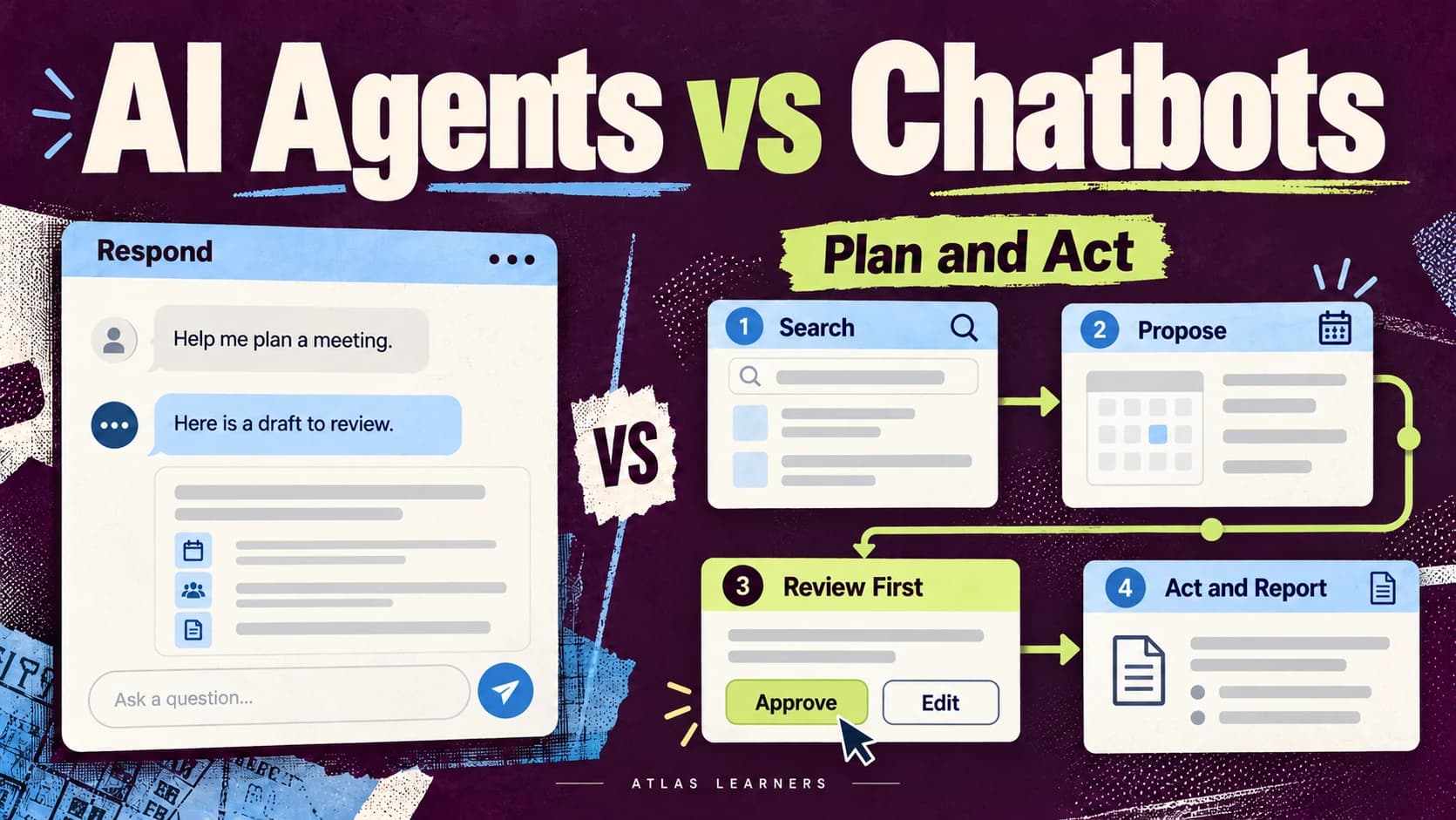
When comparing AI agents vs AI chatbots, look at how each system handles a task. A chatbot gives you a conversational interface. An agent can work toward a goal across several steps, choose from available tools, and use their results to decide what happens next.
The categories overlap. A chatbot can call tools, and an agent can appear inside a chat window. To choose sensibly, inspect the workflow, permissions, and stopping rules rather than relying on the product label. Atlas Learners’ generative AI introduction explains the models that can sit behind both.
AI Agents vs AI Chatbots and Fixed Workflows
Include fixed automation in the comparison. It is often the practical middle option between asking for a response and delegating a more open-ended goal.
System |
How Work Proceeds |
Best Starting Fit |
|---|---|---|
Chatbot or conversational assistant |
Responds to a request; may use configured tools |
Explanation, drafting, and a person-led sequence |
Fixed workflow |
Follows predefined steps and conditions |
Repeated tasks with stable rules |
AI agent |
Selects next steps using instructions, tools, and feedback |
Bounded tasks whose path needs to adapt |
Anthropic’s Building Effective Agents distinguishes workflows with predefined paths from agents whose models direct their processes and tool use. The distinction helps explain behavior, but vendors may use the terms differently.
An automated process is not necessarily agentic. A form submission that always triggers an AI draft and then saves it for review can remain a fixed workflow. Our no-code AI task guide describes that kind of sequence.
What Makes a System Agentic
An agent does more than produce a plan in text. It can use the result of one action to select another action within its authorized scope.
For example, an assistant might search approved documents, notice a missing policy detail, look in another authorized source, compare the findings, and prepare an answer. The next step depends partly on what the previous step found.
This does not mean the system has unlimited independence or understands its responsibility as a person would. Its useful behavior depends on the surrounding software, the information supplied, tool permissions, and the way success is checked.
Anthropic’s context engineering guidance explains why managing relevant information matters in multi-step systems. An agent can make a poor decision when a tool returns stale information or an earlier constraint falls out of the material available to it.
If you are new to agentic AI, ask two questions: who chooses the next step, and what can that step change?
Follow One Meeting Task
Consider a hypothetical task: find a meeting slot for two people, prepare an agenda, and draft an invitation. One person’s time zone is missing.
A Chatbot Helps You Prepare
You paste the availability notes and ask for possible slots. The chatbot can identify the missing time zone and draft an agenda. You check the details, choose the slot, and create the invitation yourself.
This is often enough when the task is occasional and you want to remain in control of every step. A tool-enabled chatbot might also read a calendar, depending on its setup; the chat interface alone does not determine its capabilities.
A Fixed Workflow Follows Known Rules
A form collects availability in a required time-zone field. A predefined rule finds overlaps, an AI step drafts an agenda from the supplied topic, and the system saves an invitation draft for review.
This works when the inputs and decision rules are stable. If required information is missing, the workflow should route the item to a person or ask for the missing field rather than improvising a meeting time.
An Agent Adapts the Sequence
An agent may inspect the approved calendars, search for an overlap, notice missing information, and decide to pause with a clarification request. After receiving the missing time zone, it can reconsider the options and prepare a draft.
The appropriate illustrative output is: “I found a possible slot, but one time zone is unconfirmed. Please confirm it before I finalize the invitation.” An output saying “Invitation sent” would be a failure if sending was outside the authorization.
Review the action log as well as the wording. A polite message does not prove that no calendar entry was created in the background.
Choose the Simplest System That Fits
Use a conversational assistant when you need a draft or explanation and can direct the sequence yourself. Use a fixed workflow when the steps and branches are predictable. Consider an agent when adapting the path provides a clear benefit that justifies additional testing and oversight.
Your Situation |
Recommended Starting Point |
Reason |
|---|---|---|
One occasional summary |
Chat assistant |
A reviewed response may finish the task |
Same input and steps every day |
Fixed workflow |
Explicit rules are easier to inspect |
Several possible research paths |
Limited agent trial |
Tool results may determine the next source |
Unclear goal or permission |
Clarify first |
More autonomy cannot resolve missing authority |
A system can combine all three approaches. For example, fixed steps can handle approvals while an agent chooses how to find the information needed for a reply.
AI workflow automation also needs a clear owner. Before handing over more work, someone should be able to explain the expected result and recognize when the process fails.
Set Permissions Before Delegating
Define what the system may read, prepare, change, and never do. Keep access limited to what the task requires, and put a review point before actions that create commitments or affect other people.
For the meeting example, a brief could allow reading two approved calendars and preparing an agenda. It could require confirmation of the slot, attendees, and message before sending, while prohibiting cancellation of existing meetings.
OpenAI’s agent safety guidance discusses tool approvals and the risks of untrusted inputs. A document or web page can contain instructions that attempt to redirect an agent. Source material should not gain authority to send data, change records, or expand permissions.

Make responsibility clear: name who approves an action, what they check, and who takes over when they are unavailable. The NIST AI Risk Management Framework gives organizations a broader structure for managing these risks.
Plan for Missing Data and Failed Actions
An agent needs a clear stopping point. If information is missing, sources conflict, or a tool keeps failing, it should pause and report what remains unfinished.
For a beginner trial, define these conditions before connecting real systems:
- Stop when a required date, identity, or time zone is missing.
- Ask for a decision when two authoritative sources conflict.
- Record failed actions and distinguish them from completed actions.
- Limit retries and check whether a previous attempt already succeeded.
- Preserve a log that a person can use to inspect or repair the result.
Suppose the calendar saves an invitation but fails to confirm it. Trying again immediately could create a duplicate. The system should first check whether the invitation exists, using a unique task reference or another record of the action.

These controls depend on how the system is built. A sentence in a prompt is not a substitute for permissions, logging, and application-level checks.
Run a Small Trial
Try a few realistic cases in a separate test setup with fictional information. Include a normal request, a missing detail, conflicting sources, and a tool failure.
Write the expected behavior first. For the missing-time-zone case, success means pausing for clarification. If saving an invitation fails, success means reporting the failure accurately and avoiding an uncontrolled retry.
Record task completion, incorrect actions, unresolved issues, and review effort. More activity is not necessarily better performance. An agent that takes many steps and still requires substantial correction may be less suitable than a simple workflow.
Keep the trial’s scope explicit. A meeting assistant that handles two fictional calendars has not demonstrated reliable scheduling across a company. New calendars, recurring events, time zones, and access restrictions introduce cases the original test did not cover.
Before expanding the trial, decide what must work. In this example, each proposed invitation must keep the correct attendees and time zone. Missing details must trigger a pause, and sending must require approval. Repeat the checks after changing tools, permissions, or instructions.
OpenAI’s general usage guidance recommends giving relevant context and checking outputs. For an AI chatbot vs agent comparison, go further: inspect the action log to see what the agent actually changed, as well as what its reply says.
Write the Delegation Brief First
Use this brief before trying an agent:
Goal: [specific result]. Allowed sources and tools: [list]. Allowed actions: [list]. Actions requiring approval: [list]. Prohibited actions: [list]. Stop and ask when: [conditions]. Completion evidence: [records or checks]. Report completed actions separately from proposals, failures, and unresolved items.
When comparing AI agents vs AI chatbots, start with the smallest setup that meets the task. A checked draft may be enough. If the task needs several changing steps, test those steps with limited access first.
Write one delegation brief and try it with fictional calendar information. Include a missing time zone and a failed action. Use the reply and action log to decide whether handing over more steps would help.